

Installation
Prerequisites
uvmust be installed and available in your system PATH. Claude Desktop runs in its own isolated environment and needsuvto manage dependencies.- On macOS, install
uvglobally with Homebrew:brew install uv. This ensures Claude Desktop can detect it.
Configure Claude Desktop
Edit your Claude Desktop config, located at:- macOS:
~/Library/Application Support/Claude/claude_desktop_config.json - Windows:
%APPDATA%\Claude\claude_desktop_config.json
Install Basic Memory (Optional)
Restart Claude Desktop
After saving the config, restart Claude Desktop. You should see Basic Memory tools available in the tools menu (hammer icon in bottom-right).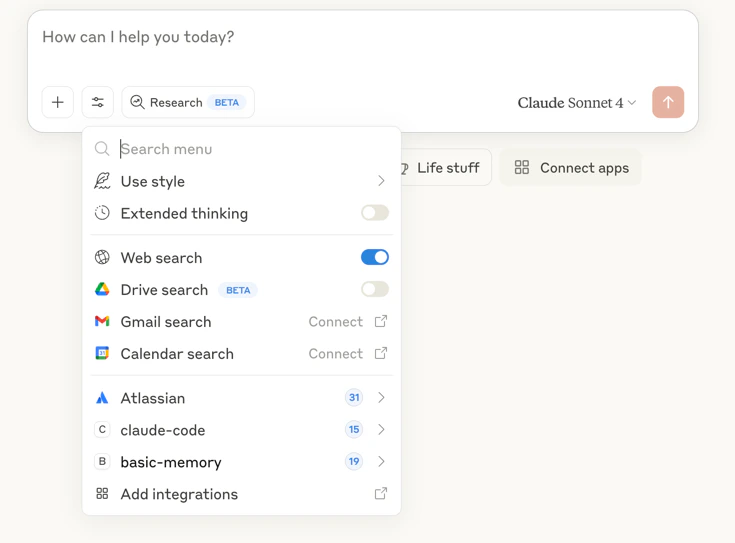
Features
Core Capabilities
Knowledge Creation
Create and update notes through natural conversation
Knowledge Search
Find information across your entire knowledge base
Context Building
Load context from previous conversations using memory:// URLs
Project Management
Switch between different knowledge projects instantly
Visual Note Display
View notes as formatted artifacts for better readability
Real-time Sync
Changes you make to files are immediately available in conversations:- Edit a file in any text editor
- Save the changes
- Ask Claude to read the note - it will see your updates
Memory URLs
Reference specific knowledge withmemory:// URLs:
Common Workflows
Creating Knowledge
During a conversation:Searching and Discovery
Find information:Project Management
Switch contexts:Advanced Usage
Special Prompts
Basic Memory includes prompts that trigger specific behaviors:- “Continue our conversation about [topic]” - Loads relevant context
- “What have we been discussing recently?” - Shows recent activity
- “Find information about [topic]” - Searches knowledge base
Incremental Editing
Instead of rewriting entire notes, Claude can edit incrementally:- Append: Add new sections to existing notes
- Prepend: Add content to the beginning
- Replace sections: Update specific parts
- Find and replace: Make targeted text changes
File Organization
Claude can help organize your knowledge base:- Move notes to appropriate folders
- Archive old content
- Create directory structures
- Maintain database consistency during moves
Troubleshooting
Common Issues
Claude can't find Basic Memory tools
Claude can't find Basic Memory tools
Solutions:
- Verify
uvis installed:which uvx - Check config file syntax is valid JSON
- Restart Claude Desktop after config changes
- Try absolute path to uvx in config
Tools appear but don't work
Tools appear but don't work
Solutions:
- Check Basic Memory is installed:
basic-memory --version - Verify sync is running:
basic-memory status - Check file permissions in
~/basic-memory - Look for error messages in Claude Desktop
Changes not syncing
Changes not syncing
Solutions:
- Confirm real-time sync is enabled (default)
- Check
basic-memory statusfor sync status - Restart sync:
basic-memory sync --watch - Verify file is in the correct project directory
Getting Help
Best Practices
Knowledge Creation
- Use descriptive titles - They become link targets
- Add semantic observations - Categorize information
- Create relations - Connect related concepts
- Use tags - Enable better search
- Review AI-generated content - Edit for accuracy
Conversation Management
- Reference existing knowledge - Use memory:// URLs
- Build incrementally - Add to existing notes
- Switch projects - Use different contexts
- Use special prompts - Leverage built-in behaviors
- Organize regularly - Keep knowledge base clean
Performance
- Archive old content - Keep active knowledge focused
- Use meaningful filenames - Improve discoverability
- Regular backups - Use git for version control
- Monitor project size - Check with
basic-memory project info
Next Steps
User Guide
Learn comprehensive usage patterns
Knowledge Format
Understand the semantic markup
CLI Reference
Command line tools and options
AI Assistant Guide
How AI assistants use Basic Memory